
Analyze a Power BI report with AI without sharing the data
Traditionally, BI specialists have almost always needed real data to analyze a result, especially when dealing with complex calculations. However, to analyze how a data model or a visual on a dashboard works, AI does not need the data, just the underlying structure.


The problem is that when we want to use artificial intelligence to help us analyze a Power BI report, we do not want to share any company data with it, whether sensitive or not.
A Power BI file (.pbix) can contain all the model information, including fact tables, dimensions, relationships, and connections to data sources. Therefore, if we send this file directly to ChatGPT (or whichever AI we are using), we could also be sharing all the data it contains.
However, there is an option that lets us share just the underlying structure of the Power BI report without sharing the records in its tables.
Exporting a Power BI template
Power BI Desktop provides a standard option for exporting a report as a template.
With our .pbix file open, we simply need to go to File → Export → Power BI template.
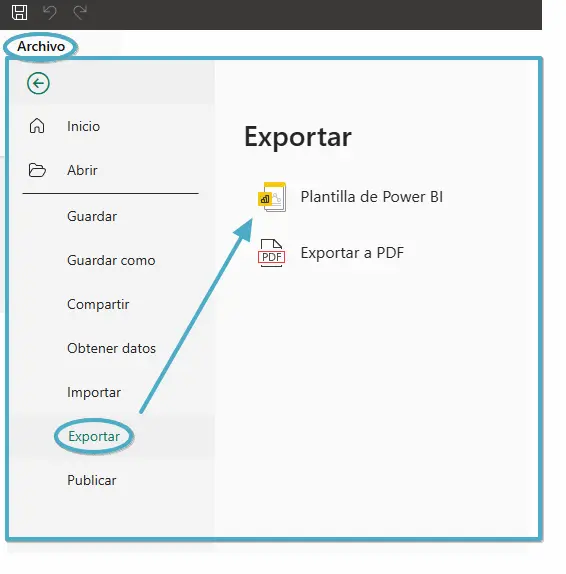
When we select this option, Power BI lets us enter a description and save the template with a name of our choice.
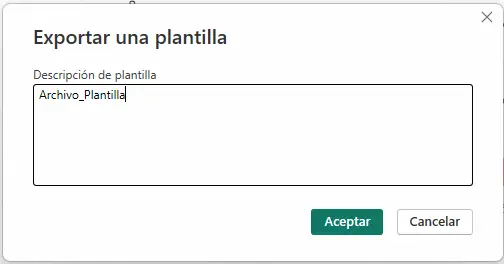
This gives us a file with the .pbit extension that preserves the report structure without including the data loaded into the model.
We can share this file with an AI that can analyze its contents to help us examine a particular DAX measure, review the relationships between tables, or understand how the model is built.
The file will also be considerably smaller than the original .pbix, making it easier to share and process.
Considerations before sharing the template
Although the .pbit file does not contain the records loaded into the tables, it is important to bear in mind that it does retain information about the model structure and the queries used.
For example, it may include server names, databases, connection paths, parameters, or even certain values we have used in report filters. This will depend on the types of connections used.
We should therefore not assume that a .pbit file is completely free of sensitive information. Before sharing it with an external AI, it is advisable to review the connections, queries, and parameters, especially when working with client information.
And it is not just for reviewing DAX measures. We can also use it to understand Power BI models we did not develop ourselves, review Power Query queries, or identify potential problems in the relationships between tables.
An idea to keep thinking about.
Explore more articles →