
AI in Business Central: agents, models and ways to customize
An initial look at the concepts and options available for incorporating AI into our Business Central customizations.


I am writing this article almost more for myself than for the website. I have spent the last few days reading about Copilot, agents and artificial intelligence in Business Central and, although some concepts seem straightforward on their own, it is easy to get confused when you start connecting them.
I do not intend to go into too much depth, but rather to get an overview of the options available for incorporating AI into our Business Central customizations. Because if there is one thing I am sure of, it is that, as consultants, we need to start changing the way we think about and approach solutions, taking all these new possibilities into account.
Agents, models and connections
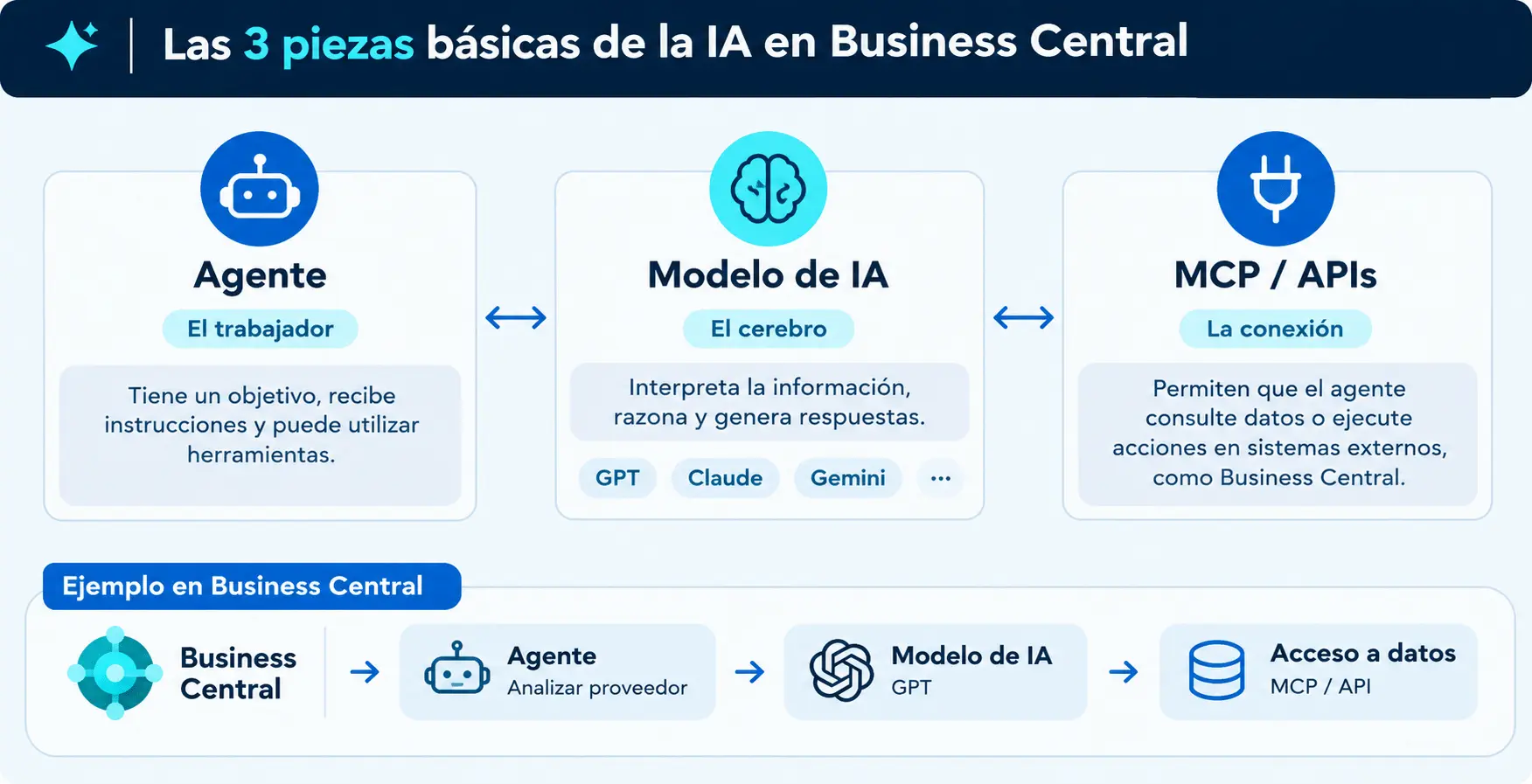
Before talking about development, I think it is important to distinguish between three concepts:
- Agent: we could think of it as a worker that has a goal, receives instructions and can use tools to carry out tasks. It does not necessarily have to be a chat, although I admit that is the first thing that comes to mind.
- AI model: it is the brain that interprets information, reasons and generates responses. I like to think of it as “the one that consumes the tokens”, and this is where we need to be careful to keep usage from getting out of hand and becoming expensive.
- API or MCP: these are mechanisms that allow an agent to connect to other systems to query information or perform actions. This is perhaps the part I find easiest to understand: it is the connection that allows the different pieces to connect and work together. We have been working with APIs for a long time, so in my opinion, this is the simplest piece of the puzzle.
AI models
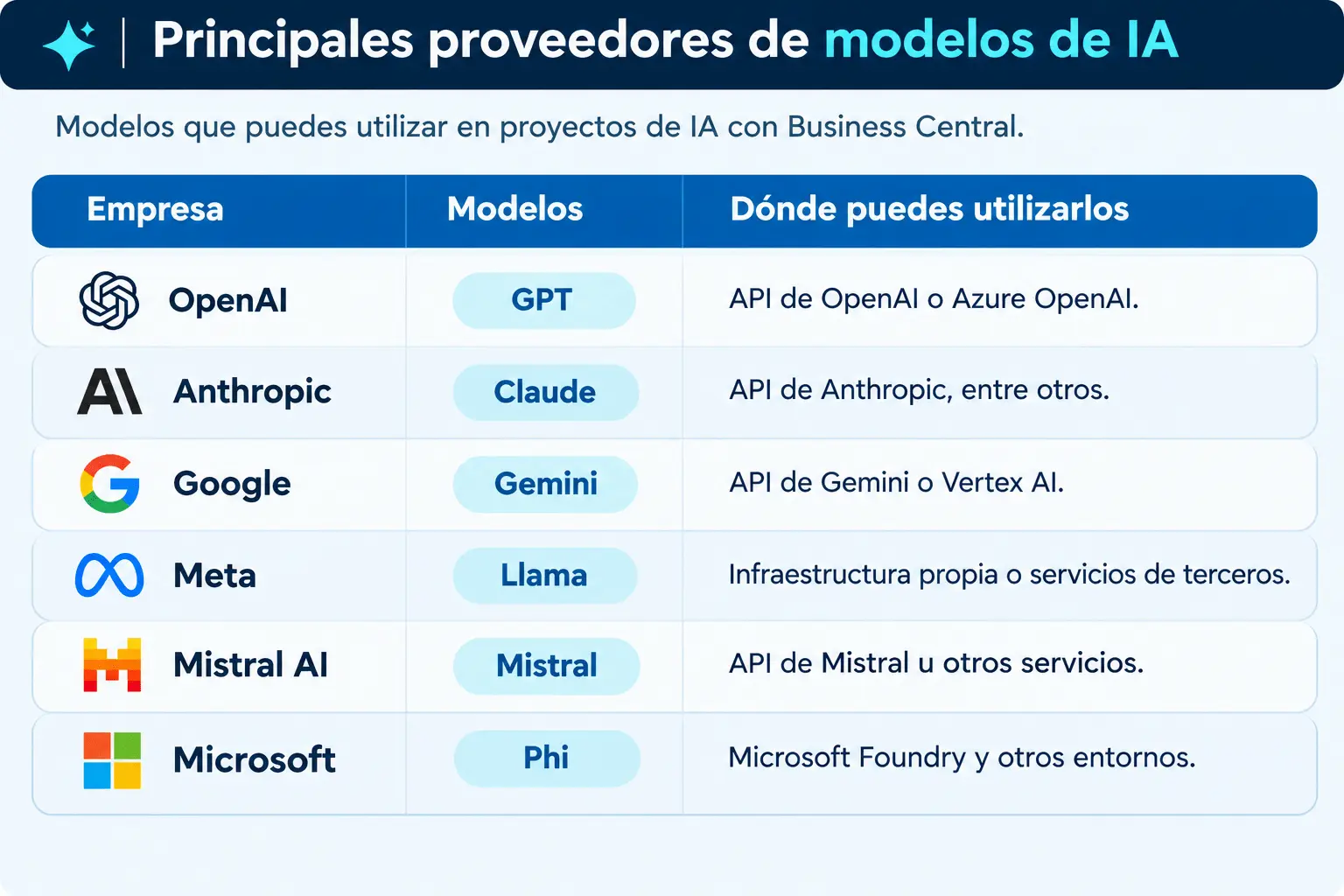
I was also a little confused here, because we often talk about GPT as if it were synonymous with artificial intelligence, but in fact GPT is a family of models developed by OpenAI.
Other companies have their own models, such as Anthropic (Claude), Google (Gemini), Meta (Llama), Mistral AI (Mistral) or Microsoft (Phi).
There is also Azure OpenAI, which is not another model, but a Microsoft Azure service that allows us to use OpenAI models from our applications.
The interesting thing is that, depending on how we develop our solution, we can choose the provider and model we want to use or work with those Microsoft already provides.
Customizing AI in Business Central
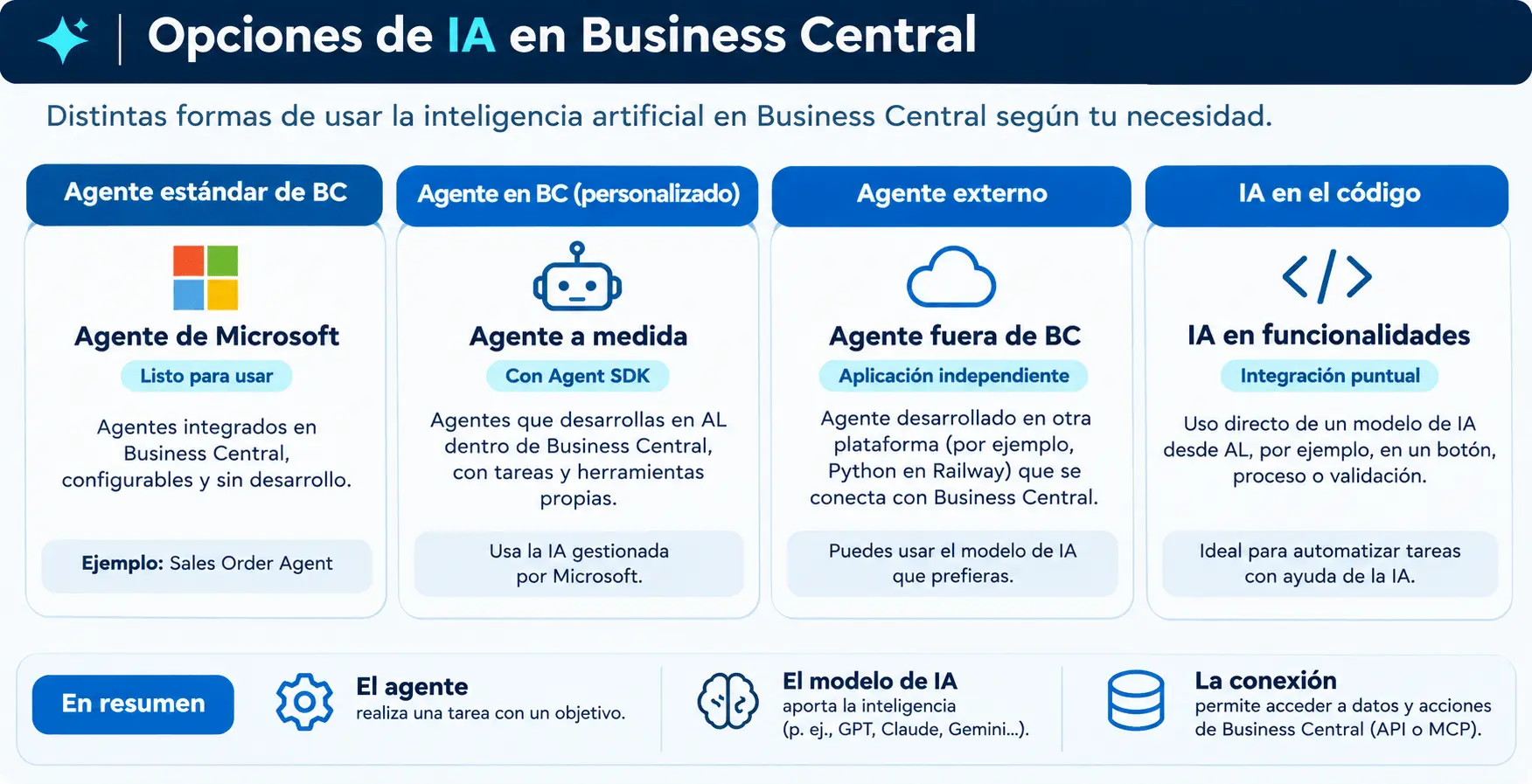
I like to think of three different approaches.
1. Create an agent inside Business Central
Develop a Copilot using AL
Microsoft provides an AI Development Toolkit that allows us to develop our own Copilot features using AL.
For example, we can create a window where the user explains what they need and the AI proposes a result they can review and accept. We can also allow the AI to perform specific actions inside Business Central, provided we have set them up beforehand.
In this case, we can use our own Azure OpenAI service, configuring the model and managing its consumption.
Create an agent inside Business Central
The other alternative is to create an agent that can carry out tasks inside Business Central, much as a user would. In other words, it can query records, open pages, run actions and decide which steps to follow to complete a task.
Here, we have two options:
- Without coding: through the Business Central agent designer, defining its instructions, permissions and tasks. It is currently in preview.
- Using AL: through the Agent SDK for AL, which allows us to develop custom agents and integrate them with our extensions.
In this case, we do not need to subscribe to our own Azure OpenAI service, since we use Microsoft’s infrastructure. However, running agents involves consumption, managed through Copilot Credits.
The main difference is that a Copilot helps the user carry out a task, while an agent can take care of executing it with a degree of autonomy.
2. Create an external agent.
Another option is to create the agent outside Business Central and then connect it so that it can query information or perform operations in the ERP.
Here, we mainly have two alternatives:
Use Microsoft Copilot Studio
Copilot Studio is a Microsoft platform that lets us create AI agents visually, without having to develop all the logic through programming. These agents can connect to Business Central through the standard Power Platform connector or using MCP (Model Context Protocol). We can also publish them in other environments, such as Microsoft Teams or a website.
In this case, Microsoft provides the AI infrastructure, and consumption is managed through Copilot Studio licenses and credits.
Develop our own agent
We can also develop the agent directly, for example, in a Python application hosted on Railway or on any other server.
Note: I mention Railway because a few weeks ago I deployed a small expense application there, using Supabase as the database and for authentication, and I am actually quite happy with how it works.
This alternative gives us more freedom, as we can choose whichever AI model we want: GPT from OpenAI, Claude from Anthropic, Gemini from Google, etc. In other words, we are the ones who manage the AI service, its integration and its consumption.
And how does our agent access Business Central data? As in the previous case, we can connect it through the usual APIs or using MCP, a standard protocol that allows agents to discover and use tools from other systems.
3. Incorporate AI directly into our AL code
I find this option particularly interesting for specific customizations, because we do not always need to develop an agent. We can use AI directly from an AL procedure, for example, when clicking a button or in the middle of a process.
Imagine we are looking for an invoice to match to a customer payment. First, we try to find it using the traditional BC filters and, if we do not find a match, we call an AI model to help us. This way, we do not have to explicitly code every possible scenario in the search process; instead, we can rely on AI to find matches that the traditional filters have not managed to locate. Of course, we must always validate the result before using it. I like this scenario because we only use AI when we really need it.
In AL, we can use System.AI with Azure OpenAI, or connect to other models through APIs. For example, I am sharing an experiment I did in TypeScript using Google’s Gemini to retrieve the countries of the European Union through a prompt. A simple experiment that helped me understand how to use AI from an application. The idea was that I did not need to account for every EU country, or even know them, because the AI looked them up and inserted them for me. And this is where I think the key lies: it is no longer always necessary to code every possible scenario, but rather to define a clear goal and rely on AI to handle them.
type Country = {
  code: string;
  name: string;
  is_eu: boolean;
};
export async function getEuCountries(): Promise<Country[]> {
  const apiKey = process.env.GEMINI_API_KEY;
  const model = process.env.GEMINI_MODEL ?? "gemini-2.5-flash";
  if (!apiKey) throw new Error("Falta GEMINI_API_KEY");
  const prompt = `
Devuelve únicamente JSON válido, sin markdown y sin explicación.
Necesito la lista actual de países miembros de la Unión Europea.
Formato exacto:
{"countries":[{"code":"ES","name":"España","is_eu":true}]}
Reglas:
- code debe ser ISO 3166-1 alpha-2 en mayúsculas.
- name debe estar en español.
- is_eu debe ser true.
- No incluyas países que no sean miembros actuales de la Unión Europea.
  `.trim();
  const response = await fetch(
    `https://generativelanguage.googleapis.com/v1beta/models/${model}:generateContent?key=${apiKey}`,
    {
      method: "POST",
      headers: { "Content-Type": "application/json" },
      body: JSON.stringify({
        contents: [{ role: "user", parts: [{ text: prompt }] }],
        generationConfig: {
          temperature: 0,
          responseMimeType: "application/json",
        },
      }),
    },
  );
  if (!response.ok) {
    throw new Error(`Error de Gemini: ${await response.text()}`);
  }
  const data = await response.json();
  const text = data.candidates?.[0]?.content?.parts
    ?.map((part: { text?: string }) => part.text ?? "")
    .join("\n");
  if (!text) throw new Error("Gemini no devolvió contenido");
  const parsed = JSON.parse(
    text
      .trim()
      .replace(/^```(?:json)?\s*/i, "")
      .replace(/```$/, ""),
  );
  if (!Array.isArray(parsed.countries)) {
    throw new Error("La respuesta no contiene una lista de países");
  }
  return parsed.countries
    .map((country: Country) => ({
      code: String(country.code ?? "")
        .trim()
        .toUpperCase(),
      name: String(country.name ?? "").trim(),
      is_eu: Boolean(country.is_eu),
    }))
    .filter(
      (country: Country) =>
        country.code.length === 2 && country.name.length > 0 && country.is_eu,
    );
}
Microsoft’s standard agents
In addition to the development options discussed, Business Central already includes standard agents, such as the Sales Order Agent or the Payables Agent. In these cases, we do not have to develop the agent from scratch, but instead configure and use the capabilities Microsoft provides. However, we will look at this in more depth in another article.
Considerations
For now, I think the most important thing is to understand the differences between these approaches and, above all, know when it makes sense to use each one.
I do not think everything needs to be solved with agents. In some cases, incorporating a call to an AI model into an AL procedure will be enough, while in others it may make more sense to develop a complete agent, either inside or outside Business Central.
This article is simply an initial attempt to organize these concepts. My plan is to carry out real experiments with each of these options and share them on the website in new articles, with code examples, configurations and the problems I encounter along the way.
An idea to keep thinking about.
Explore more articles →